> ## Documentation Index
> Fetch the complete documentation index at: https://docs.avoca.ai/llms.txt
> Use this file to discover all available pages before exploring further.
# How do I build a multi-step campaign?
> Create sequenced workflows that move a lead from first contact through reminders, estimate follow-up, and review requests.
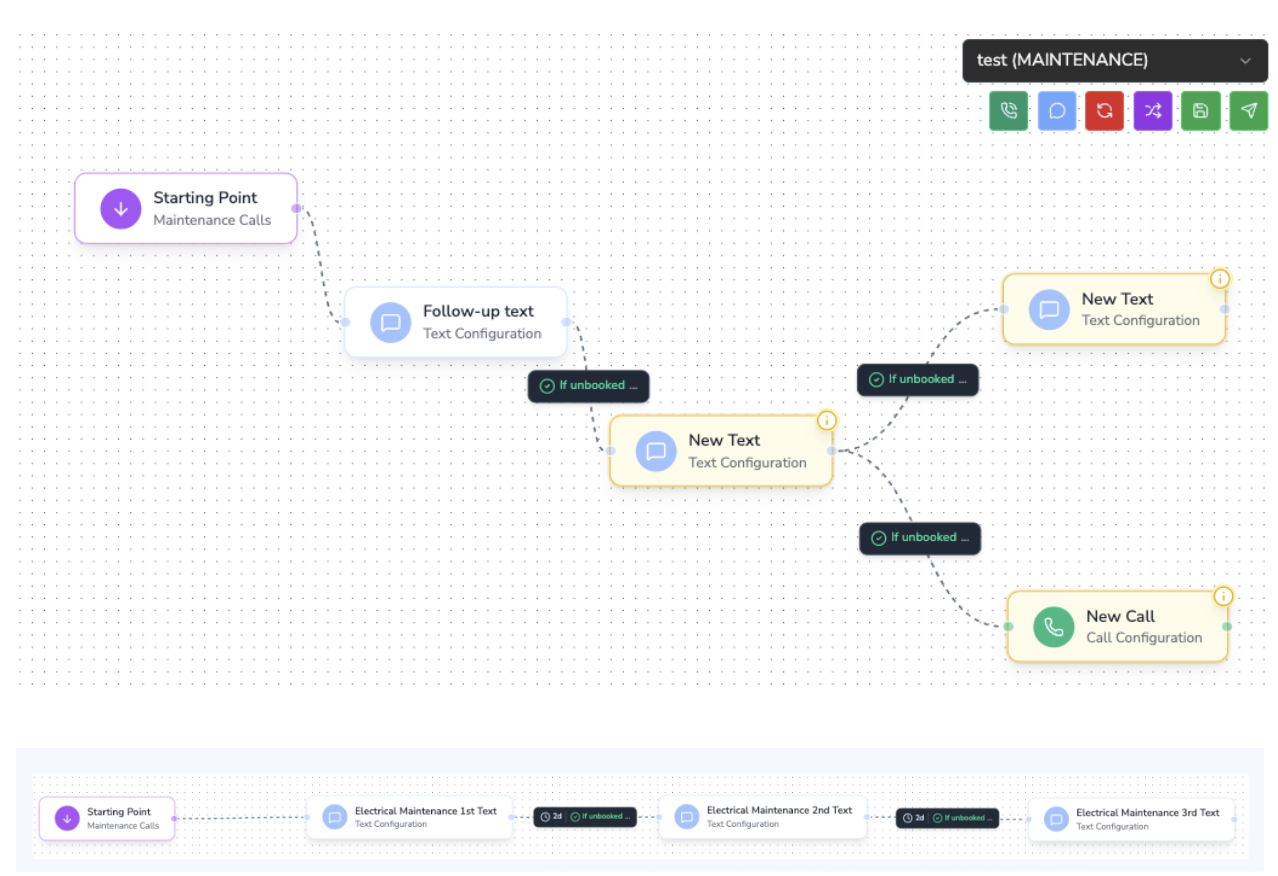
Avoca's campaign builder lets you chain multiple SMS (and optional voice/email) steps into a single automated workflow. Each step can have its own timing delay, branching rules, and personalization tokens sourced from your CRM or ServiceTitan integration.
Watch a quick walkthrough of the audience builder powering multi-step campaigns.
## Core Building Blocks
1. **Entry Trigger** – Choose the event or audience that feeds the campaign (e.g., new lead, audience filter, ServiceTitan event).
2. **Action Steps** – Add SMS, voice, or task steps that send messages, assign reps, or update tags.
3. **Rules & Branching** – Define wait timers, conditional logic, and exit criteria.
4. **Goals / Exit Conditions** – Automatically stop the campaign once the lead converts, replies, or books.
## Example: New Lead → Reminder → Estimate Follow-Up → Review Request
| Step | Timing | Action | Rule Highlights |
| --------------------- | ---------------------------- | -------------------------------------------------- | -------------------------------------------------- |
| 1. New Lead Follow-Up | Immediate | Send intro SMS with booking link. | Personalize with lead name, service type. |
| 2. Reminder | +24 hours | Send nudge if no reply or appointment. | Conditional branch: skip if appointment scheduled. |
| 3. Estimate Follow-Up | +72 hours from estimate | Confirm they received the estimate and offer help. | Pull estimate amount/status from ServiceTitan. |
| 4. Review Request | +7 days after job completion | Thank customer and share review link. | Exit early if review already submitted tag exists. |
## Building the Campaign
### 1. Define the Audience and Trigger
* Use a ServiceTitan audience (e.g., "New Lead Created") or an Avoca audience filter (lead source, job type, geography).
* Decide whether the workflow should re-enroll leads when new events occur or only run once per customer.
### 2. Add the First Touch
* Insert an SMS action with dynamic fields like `{customer.first_name}`, `{job.type}`, or custom tokens.
* Enable automatic opt-out language if required in your region.
### 3. Insert Wait Timers and Conditions
* Use **Delay** blocks to pause for hours/days between steps.
* Add **Conditional** nodes to check CRM fields (appointment scheduled, estimate status, membership tier) before sending the next message.
### 4. Layer Additional Steps
* Reminder SMS: Send only if `response_status = no_reply`.
* Estimate follow-up: Trigger from ServiceTitan's estimate creation timestamp or stage change.
* Review request: Reference job completion date and include a dynamic review link.
### 5. Configure Exit Rules
* Stop the campaign when the customer replies with a booking confirmation keyword.
* Remove customers who call in and convert via another channel.
* Apply tags (e.g., `review-request-sent`) so downstream workflows know the customer exited.
### 6. Test and Launch
* Run the workflow in **Test Mode** to preview message content and delays.
* Set the campaign live and monitor analytics (response rate, conversion rate, drop-offs per step).
## Best Practices
* **Segment by intent**: Create separate branches for hot leads vs. colder follow-ups.
* **Use throttling**: Limit daily sends to avoid overwhelming a small team with callbacks.
* **Combine channels**: Mix SMS with call tasks or email nudges for higher conversion.
* **Maintain compliance**: Respect opt-out keywords and automatically suppress unsubscribed contacts.
Need help configuring a specific flow? Reach out to your Avoca account team or [support@avoca.ai](mailto:support@avoca.ai) and we’ll model the sequence for you.
 ## Core Building Blocks
1. **Entry Trigger** – Choose the event or audience that feeds the campaign (e.g., new lead, audience filter, ServiceTitan event).
2. **Action Steps** – Add SMS, voice, or task steps that send messages, assign reps, or update tags.
3. **Rules & Branching** – Define wait timers, conditional logic, and exit criteria.
4. **Goals / Exit Conditions** – Automatically stop the campaign once the lead converts, replies, or books.
## Example: New Lead → Reminder → Estimate Follow-Up → Review Request
| Step | Timing | Action | Rule Highlights |
| --------------------- | ---------------------------- | -------------------------------------------------- | -------------------------------------------------- |
| 1. New Lead Follow-Up | Immediate | Send intro SMS with booking link. | Personalize with lead name, service type. |
| 2. Reminder | +24 hours | Send nudge if no reply or appointment. | Conditional branch: skip if appointment scheduled. |
| 3. Estimate Follow-Up | +72 hours from estimate | Confirm they received the estimate and offer help. | Pull estimate amount/status from ServiceTitan. |
| 4. Review Request | +7 days after job completion | Thank customer and share review link. | Exit early if review already submitted tag exists. |
## Building the Campaign
### 1. Define the Audience and Trigger
* Use a ServiceTitan audience (e.g., "New Lead Created") or an Avoca audience filter (lead source, job type, geography).
* Decide whether the workflow should re-enroll leads when new events occur or only run once per customer.
### 2. Add the First Touch
* Insert an SMS action with dynamic fields like `{customer.first_name}`, `{job.type}`, or custom tokens.
* Enable automatic opt-out language if required in your region.
### 3. Insert Wait Timers and Conditions
* Use **Delay** blocks to pause for hours/days between steps.
* Add **Conditional** nodes to check CRM fields (appointment scheduled, estimate status, membership tier) before sending the next message.
### 4. Layer Additional Steps
* Reminder SMS: Send only if `response_status = no_reply`.
* Estimate follow-up: Trigger from ServiceTitan's estimate creation timestamp or stage change.
* Review request: Reference job completion date and include a dynamic review link.
### 5. Configure Exit Rules
* Stop the campaign when the customer replies with a booking confirmation keyword.
* Remove customers who call in and convert via another channel.
* Apply tags (e.g., `review-request-sent`) so downstream workflows know the customer exited.
### 6. Test and Launch
* Run the workflow in **Test Mode** to preview message content and delays.
* Set the campaign live and monitor analytics (response rate, conversion rate, drop-offs per step).
## Best Practices
* **Segment by intent**: Create separate branches for hot leads vs. colder follow-ups.
* **Use throttling**: Limit daily sends to avoid overwhelming a small team with callbacks.
* **Combine channels**: Mix SMS with call tasks or email nudges for higher conversion.
* **Maintain compliance**: Respect opt-out keywords and automatically suppress unsubscribed contacts.
Need help configuring a specific flow? Reach out to your Avoca account team or [support@avoca.ai](mailto:support@avoca.ai) and we’ll model the sequence for you.
## Core Building Blocks
1. **Entry Trigger** – Choose the event or audience that feeds the campaign (e.g., new lead, audience filter, ServiceTitan event).
2. **Action Steps** – Add SMS, voice, or task steps that send messages, assign reps, or update tags.
3. **Rules & Branching** – Define wait timers, conditional logic, and exit criteria.
4. **Goals / Exit Conditions** – Automatically stop the campaign once the lead converts, replies, or books.
## Example: New Lead → Reminder → Estimate Follow-Up → Review Request
| Step | Timing | Action | Rule Highlights |
| --------------------- | ---------------------------- | -------------------------------------------------- | -------------------------------------------------- |
| 1. New Lead Follow-Up | Immediate | Send intro SMS with booking link. | Personalize with lead name, service type. |
| 2. Reminder | +24 hours | Send nudge if no reply or appointment. | Conditional branch: skip if appointment scheduled. |
| 3. Estimate Follow-Up | +72 hours from estimate | Confirm they received the estimate and offer help. | Pull estimate amount/status from ServiceTitan. |
| 4. Review Request | +7 days after job completion | Thank customer and share review link. | Exit early if review already submitted tag exists. |
## Building the Campaign
### 1. Define the Audience and Trigger
* Use a ServiceTitan audience (e.g., "New Lead Created") or an Avoca audience filter (lead source, job type, geography).
* Decide whether the workflow should re-enroll leads when new events occur or only run once per customer.
### 2. Add the First Touch
* Insert an SMS action with dynamic fields like `{customer.first_name}`, `{job.type}`, or custom tokens.
* Enable automatic opt-out language if required in your region.
### 3. Insert Wait Timers and Conditions
* Use **Delay** blocks to pause for hours/days between steps.
* Add **Conditional** nodes to check CRM fields (appointment scheduled, estimate status, membership tier) before sending the next message.
### 4. Layer Additional Steps
* Reminder SMS: Send only if `response_status = no_reply`.
* Estimate follow-up: Trigger from ServiceTitan's estimate creation timestamp or stage change.
* Review request: Reference job completion date and include a dynamic review link.
### 5. Configure Exit Rules
* Stop the campaign when the customer replies with a booking confirmation keyword.
* Remove customers who call in and convert via another channel.
* Apply tags (e.g., `review-request-sent`) so downstream workflows know the customer exited.
### 6. Test and Launch
* Run the workflow in **Test Mode** to preview message content and delays.
* Set the campaign live and monitor analytics (response rate, conversion rate, drop-offs per step).
## Best Practices
* **Segment by intent**: Create separate branches for hot leads vs. colder follow-ups.
* **Use throttling**: Limit daily sends to avoid overwhelming a small team with callbacks.
* **Combine channels**: Mix SMS with call tasks or email nudges for higher conversion.
* **Maintain compliance**: Respect opt-out keywords and automatically suppress unsubscribed contacts.
Need help configuring a specific flow? Reach out to your Avoca account team or [support@avoca.ai](mailto:support@avoca.ai) and we’ll model the sequence for you.