> ## Documentation Index
> Fetch the complete documentation index at: https://docs.avoca.ai/llms.txt
> Use this file to discover all available pages before exploring further.
# What reporting, attribution, and dashboards are available?
> See how Avoca surfaces campaign metrics, links jobs to ServiceTitan revenue, and supports CSR workflows.
Avoca’s reporting suite spans campaign-level dashboards, job attribution back to ServiceTitan, and live views that CSRs can work from.
## Campaign Reporting
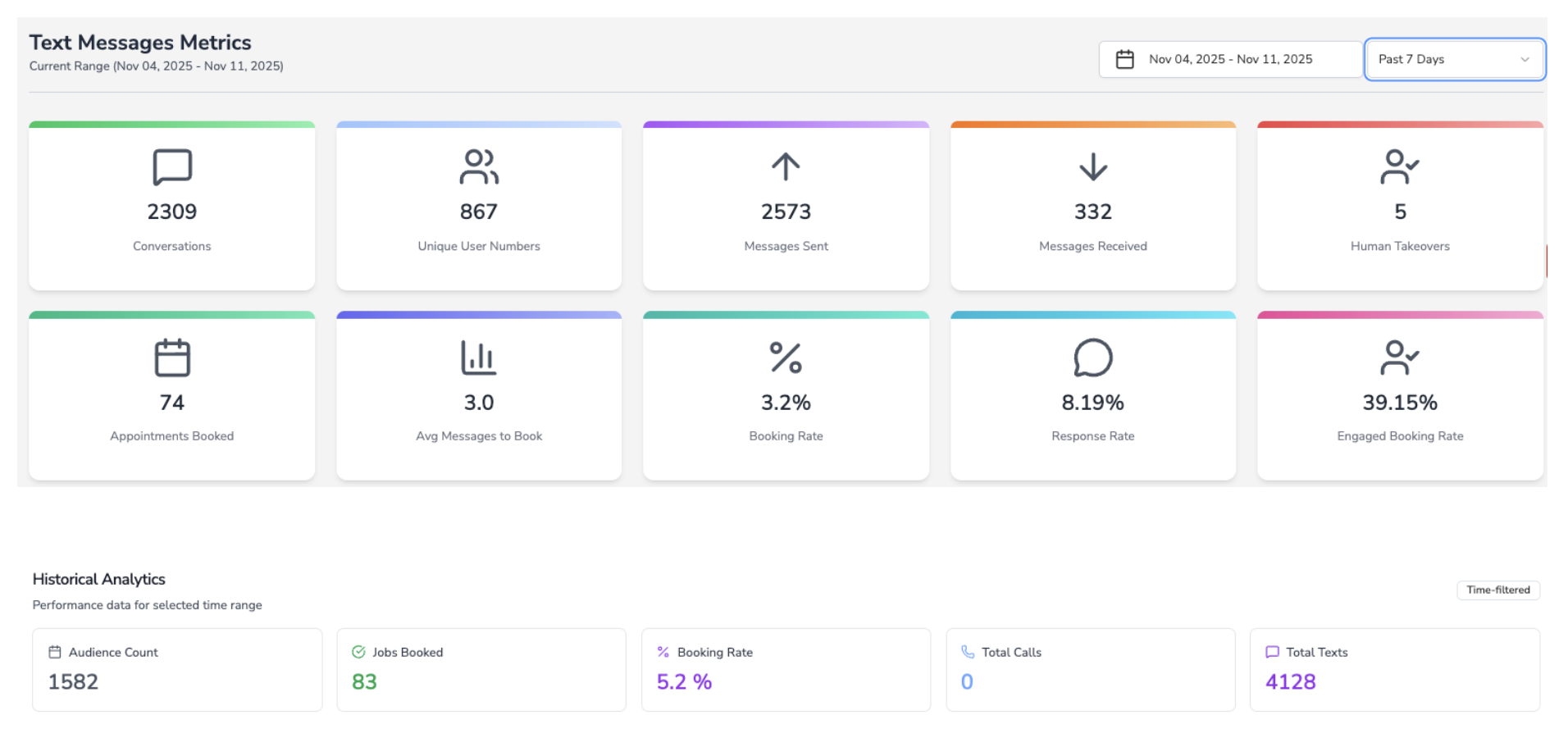
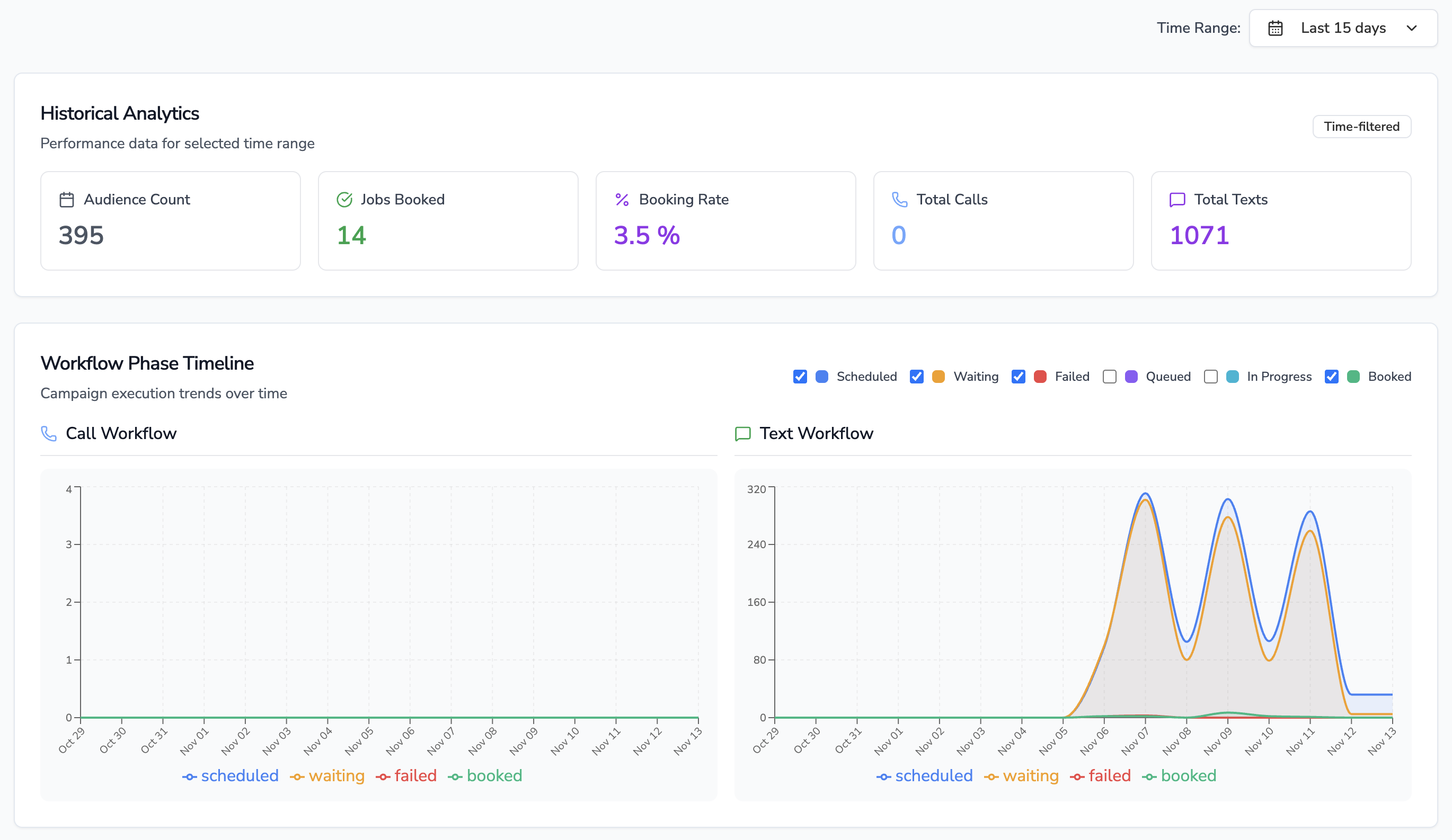
* Campaigns share a single dashboard that blends real-time telemetry (“Waiting Calls/Texts”, “Scheduled”, “Completed Today”) with historical KPIs (“Audience Count”, “Jobs Booked”, booking rate, total calls/texts).
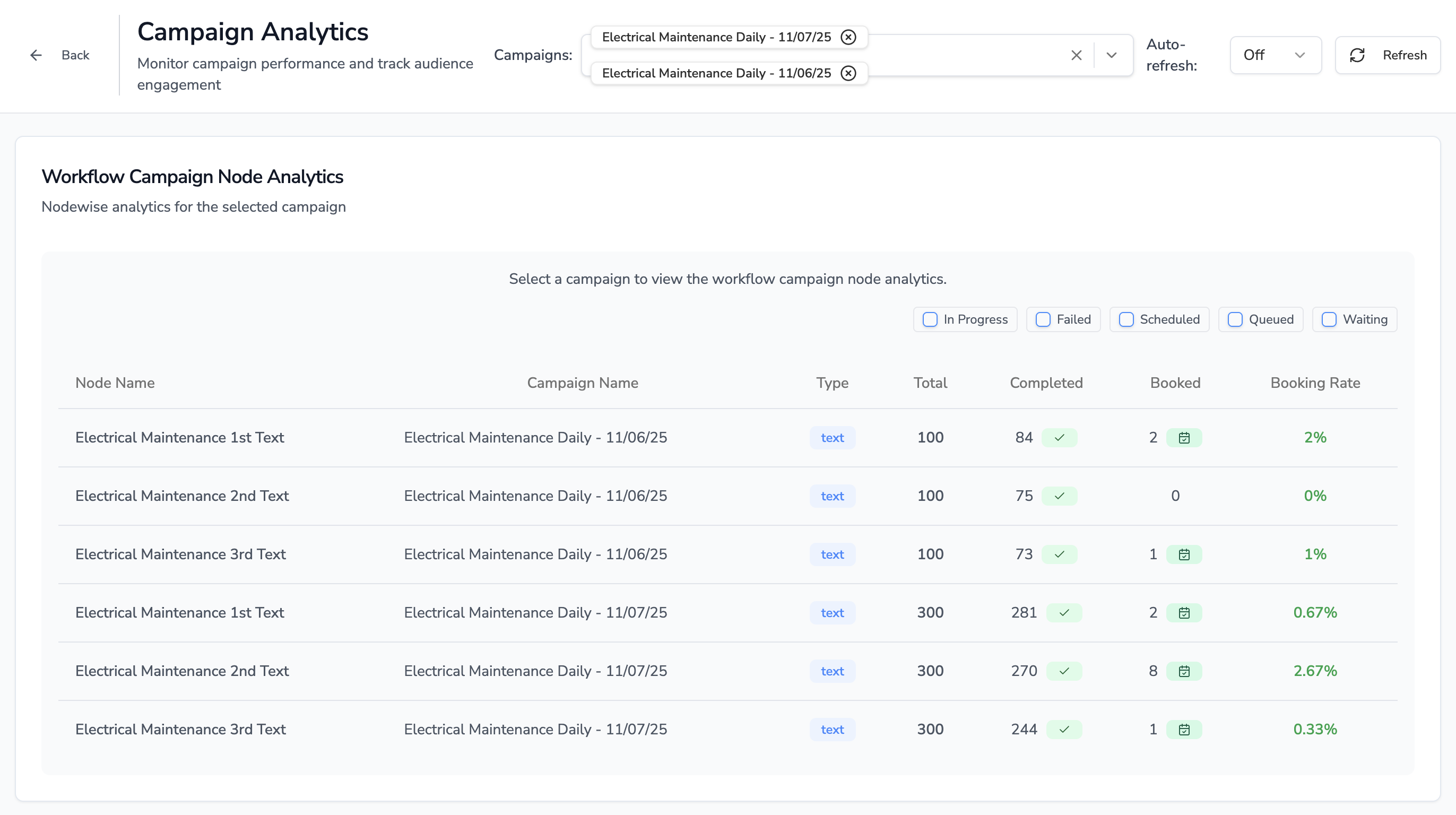
* Drilling into a published campaign reveals a node-by-node table showing how many contacts were scheduled, queued, waiting, failed, completed, and booked—making deliverability, reply rates, and opt-out counts visible per step.
* SMS steps that include trackable short links feed click counts and click-rate percentages into the analytics dataset, so clicks sit alongside replies and conversions.
Watch the campaign analytics flow in action.
## Attribution to Leads, Jobs, and Revenue
* Each audience member carries ServiceTitan customer IDs, job IDs, job types, and appointment timestamps throughout the workflow.
* When a workflow node books a visit (via call or text), the analytics service increments “Jobs Booked” and logs the exact campaign audience record plus the originating node.
* Because every booked job references the original ServiceTitan identifiers, downstream revenue attribution in ServiceTitan reports remains intact—you can trace installs or estimates back to the originating SMS branch.
## CSR / Employee Workflow
1. **Segment & Launch** – A CSR or marketer builds the audience, then uses the campaign creation modal to pick the workflow, audience, sending number, business-unit/tag filters, and launch time (all ServiceTitan targeting fields are available there).
2. **Monitor & Interact** – After launch, the CSR watches campaign status (Created, Scheduled, Active, Paused, Completed) and live counts of completed calls/texts. The analytics view shows the workflow diagram with node metrics, and inbound replies open conversation threads where CSRs can chat, log notes, or escalate.
3. **Compliance & Opt-Outs** – STOP/RESET or conversational opt-out replies automatically mark contacts as opted out, close the thread, and highlight the state inside the conversation UI so agents don’t re-engage inadvertently.
## A/B Testing & Comparisons
* Native split-testing isn’t released yet. Today teams clone workflows or campaigns, tweak messaging or branching, and compare booking rate, failures, and job counts side-by-side in the analytics dashboard.
* Full A/B testing is on the roadmap; once available, the analytics view will treat each variant as part of a single experiment instead of separate campaigns.
Need a specific report or export? Contact your Avoca account team or [support@avoca.ai](mailto:support@avoca.ai).
 ## Attribution to Leads, Jobs, and Revenue
* Each audience member carries ServiceTitan customer IDs, job IDs, job types, and appointment timestamps throughout the workflow.
* When a workflow node books a visit (via call or text), the analytics service increments “Jobs Booked” and logs the exact campaign audience record plus the originating node.
* Because every booked job references the original ServiceTitan identifiers, downstream revenue attribution in ServiceTitan reports remains intact—you can trace installs or estimates back to the originating SMS branch.
## CSR / Employee Workflow
1. **Segment & Launch** – A CSR or marketer builds the audience, then uses the campaign creation modal to pick the workflow, audience, sending number, business-unit/tag filters, and launch time (all ServiceTitan targeting fields are available there).
2. **Monitor & Interact** – After launch, the CSR watches campaign status (Created, Scheduled, Active, Paused, Completed) and live counts of completed calls/texts. The analytics view shows the workflow diagram with node metrics, and inbound replies open conversation threads where CSRs can chat, log notes, or escalate.
3. **Compliance & Opt-Outs** – STOP/RESET or conversational opt-out replies automatically mark contacts as opted out, close the thread, and highlight the state inside the conversation UI so agents don’t re-engage inadvertently.
## A/B Testing & Comparisons
* Native split-testing isn’t released yet. Today teams clone workflows or campaigns, tweak messaging or branching, and compare booking rate, failures, and job counts side-by-side in the analytics dashboard.
* Full A/B testing is on the roadmap; once available, the analytics view will treat each variant as part of a single experiment instead of separate campaigns.
Need a specific report or export? Contact your Avoca account team or [support@avoca.ai](mailto:support@avoca.ai).
## Attribution to Leads, Jobs, and Revenue
* Each audience member carries ServiceTitan customer IDs, job IDs, job types, and appointment timestamps throughout the workflow.
* When a workflow node books a visit (via call or text), the analytics service increments “Jobs Booked” and logs the exact campaign audience record plus the originating node.
* Because every booked job references the original ServiceTitan identifiers, downstream revenue attribution in ServiceTitan reports remains intact—you can trace installs or estimates back to the originating SMS branch.
## CSR / Employee Workflow
1. **Segment & Launch** – A CSR or marketer builds the audience, then uses the campaign creation modal to pick the workflow, audience, sending number, business-unit/tag filters, and launch time (all ServiceTitan targeting fields are available there).
2. **Monitor & Interact** – After launch, the CSR watches campaign status (Created, Scheduled, Active, Paused, Completed) and live counts of completed calls/texts. The analytics view shows the workflow diagram with node metrics, and inbound replies open conversation threads where CSRs can chat, log notes, or escalate.
3. **Compliance & Opt-Outs** – STOP/RESET or conversational opt-out replies automatically mark contacts as opted out, close the thread, and highlight the state inside the conversation UI so agents don’t re-engage inadvertently.
## A/B Testing & Comparisons
* Native split-testing isn’t released yet. Today teams clone workflows or campaigns, tweak messaging or branching, and compare booking rate, failures, and job counts side-by-side in the analytics dashboard.
* Full A/B testing is on the roadmap; once available, the analytics view will treat each variant as part of a single experiment instead of separate campaigns.
Need a specific report or export? Contact your Avoca account team or [support@avoca.ai](mailto:support@avoca.ai).