

Overview
Outbound orchestration follows a simple loop of segment → automate → launch → measure. Audience lists feed campaigns, campaigns bind published workflows, and analytics slices performance by campaign/workflow so marketers can immediately see how changes propagate. Audience rows also surface campaign reuse counts so marketing teams understand downstream blast radius before editing high-value segments.Audience Builder
- List inventory & controls: The audience list page fetches every list with customer counts, campaign usage, and archive/unarchive actions while exposing a scheduling dialog for ServiceTitan-driven lists.
- Create once, handle every source: The builder supports ServiceTitan API, custom reports, CSV uploads, and Speed-to-Lead imports with dynamic filters, cron schedules, exclusions, and CSV validation before persisting both list metadata and members.
- Scheduling visibility: The scheduling view shows cron definitions with human summaries, next run times, and status chips while a single toggle enables or disables both the list and the backing cron row.
- Channel-aware scheduling modal: Operators pick call or text channels, map the correct Vapi/text assistant, require hold reasons for reschedules, and launch ServiceTitan maintenance/reschedule/text jobs with hash-based dedupe and “put on hold” failure surfacing.
- Actionable audience details: Detail views combine pagination, search, and a campaign-usage panel so marketers know exactly who they’ll affect and where the list is already wired in.
Workflows
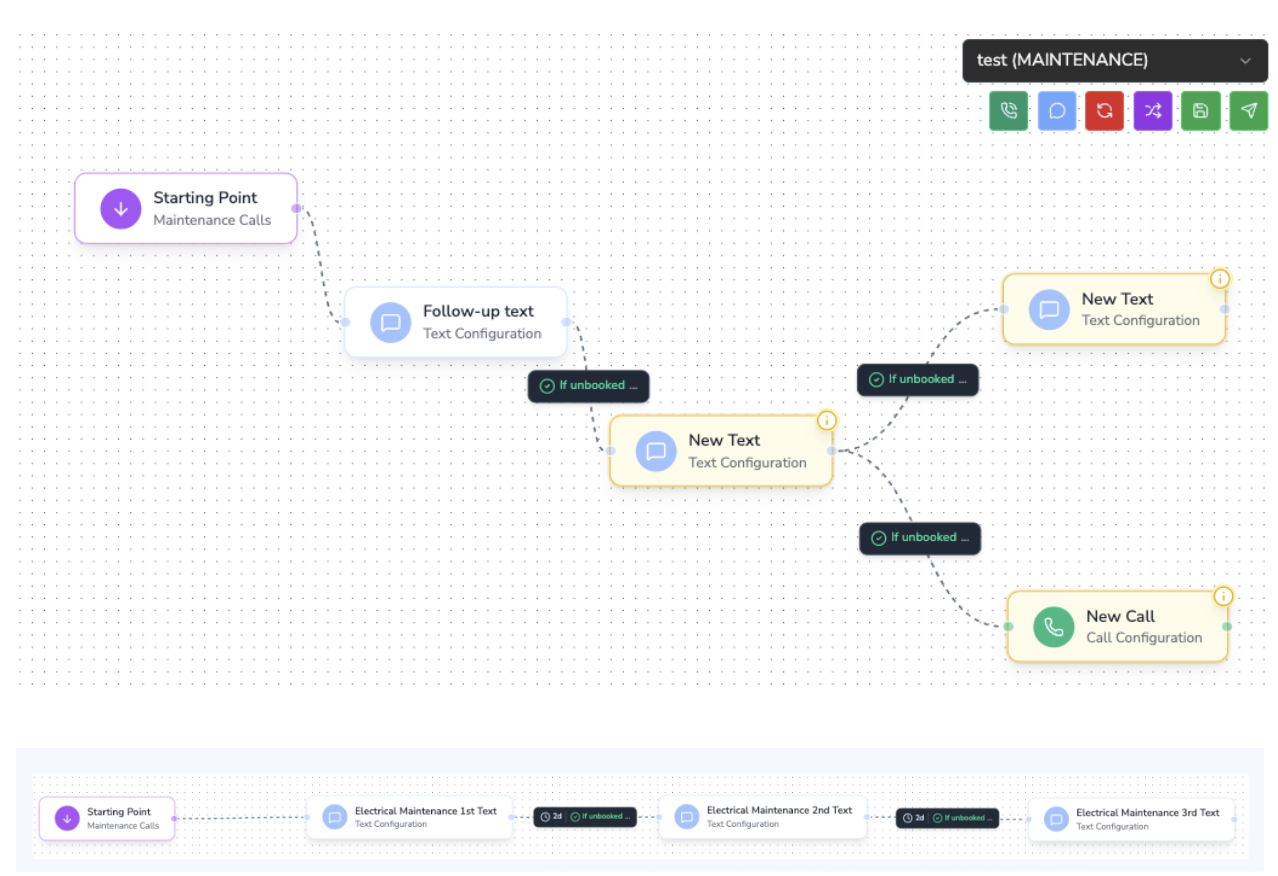
- Visual editor: React Flow powers custom trigger/call/text nodes, animated edges, validation overlays, and a toolbar/log panel. Publishing flips the canvas into read-only mode for safe inspection.
- Data + validation hooks: Hooks load nodes/edges from Supabase, translate rows into React Flow structures, run validation, and surface node/edge errors inline. Actions cover dragging, connecting, auto-layout, saving, and deletion while preserving trigger nodes.
- Server protections: Server actions validate the entire graph before save, delete orphaned rows, upsert node config (business hours, batching, assistant IDs, template overrides), and update edge qualification rules. Publishing/archiving cascades status changes so live flows stay immutable.
Campaigns
- Workspace + editor modal: The campaigns page hosts the table, inline editor, and deep links into analytics for one-click monitoring.
- Operational guardrails: Tables surface workflow/audience joins, created/queued/completed counts, and gate editing to campaigns in
CREATED. Pause/resume follows valid transitions with confirmation dialogs that spell out expected behavior. - Launch-ready modal: The modal loads prerequisites (published workflows, compatible lists, verified numbers, ServiceTitan tags/campaigns, optional exclusions), toggles ServiceTitan targeting, and creates/updates campaigns with immediate scheduling support.
- Fan-out filters: Campaigns can automatically expand their audience to net-new matching leads, so fresh leads flow into an active campaign without rebuilding the audience list.
Analytics
- Unified monitoring: Campaign selectors, date/time presets, auto-refresh intervals, and cards expose queue depth, workflow-node outcomes, historical throughput, and audience stats.
- High-signal hook: The analytics hook loads campaigns once, fetches workflow metadata for single-campaign views, polls instant analytics, retrieves timeseries via Supabase RPCs, filters trigger nodes, and formats chart buckets with adaptive timestamps.
- Aligned back end: RPCs power instant metrics (waiting/queued/in-progress/booked counts) plus historical phase/time analytics so monitoring stays in lockstep with campaign truth.
Next Steps
- Illustrate the data flow between audiences, workflows, campaigns, and analytics in the public docs to reinforce how changes propagate.
- Call out operational guardrails—status transitions, archiving rules, cron prerequisites—so users know which states allow editing and what validation will block unsafe actions.